
Nano Banana 2 Release vs. Nano Banana: The Evolution of AI Visuals
In the rapidly shifting landscape of AI image generation, the leap from one model generation to the next can feel like moving from a sketchpad to a movie set. For creators who demand the highest visual fidelity, the transition from the original Nano Banana to Nano Banana 2 (and its high-end sibling, Nano Banana Pro) represents a massive breakthrough in digital artistry.
The official nano banana 2 release on February 26, 2026, marked a turning point where high-speed generation finally met studio-grade quality.
Core Comparison: A Generational Leap
To understand where your creative tools stand, look at the architectural differences between these models:
| Feature | Nano Banana (Legacy) | Nano Banana 2 (Current) | Nano Banana Pro (Enhanced) |
| Model Positioning | Early experimental version | Primary flagship standard model | High-precision refinement model |
| Visual Fidelity | Basic; "AI-looking" textures | Hyper-realistic skin/fabric | Cinematic, gallery-grade depth |
| Lighting Engine | Simple linear lighting | Dynamic global illumination | Physical light-path tracing |
| Daily Quota | N/A | 1,000 images/day (Pro) | 100 images/day (Pro) |
Visual Evolution: 4 Core Prompt Case Studies
To truly see the power of the current model, creators can leverage the advanced capabilities found in Google Labs to test how different prompts perform across generations.
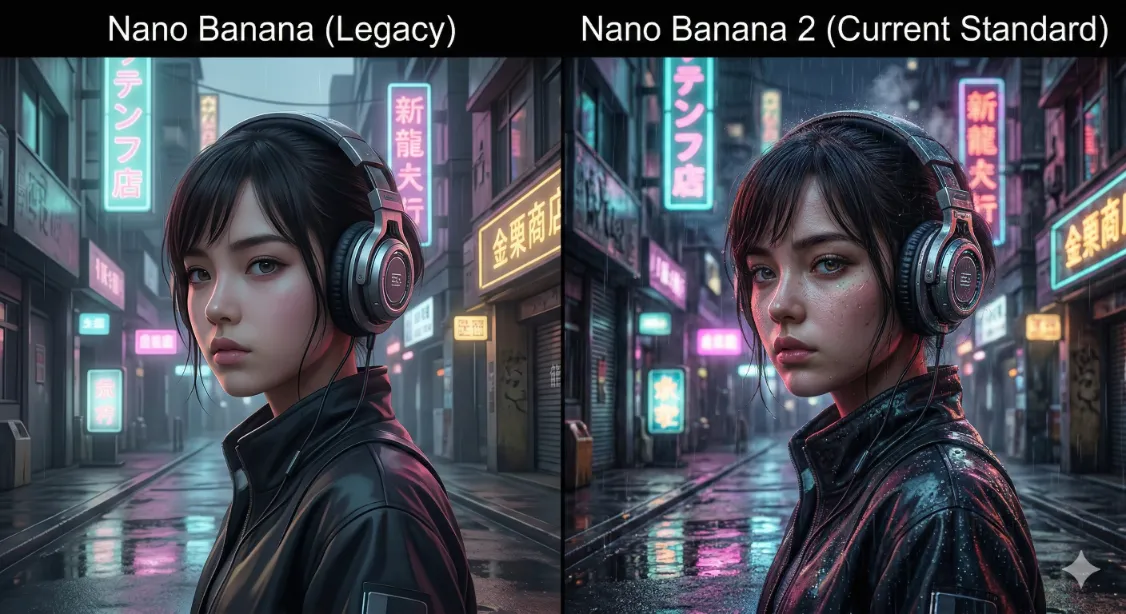
1. The Cyberpunk Aesthetic
Prompt: A split-screen comparison. Cyberpunk girl with futuristic headphones in a neon city, rain reflections on the street.
Analysis: While the legacy model struggles with blurry neon signs, the current engine captures the micro-textures of metal and the complex refraction of light in every raindrop.
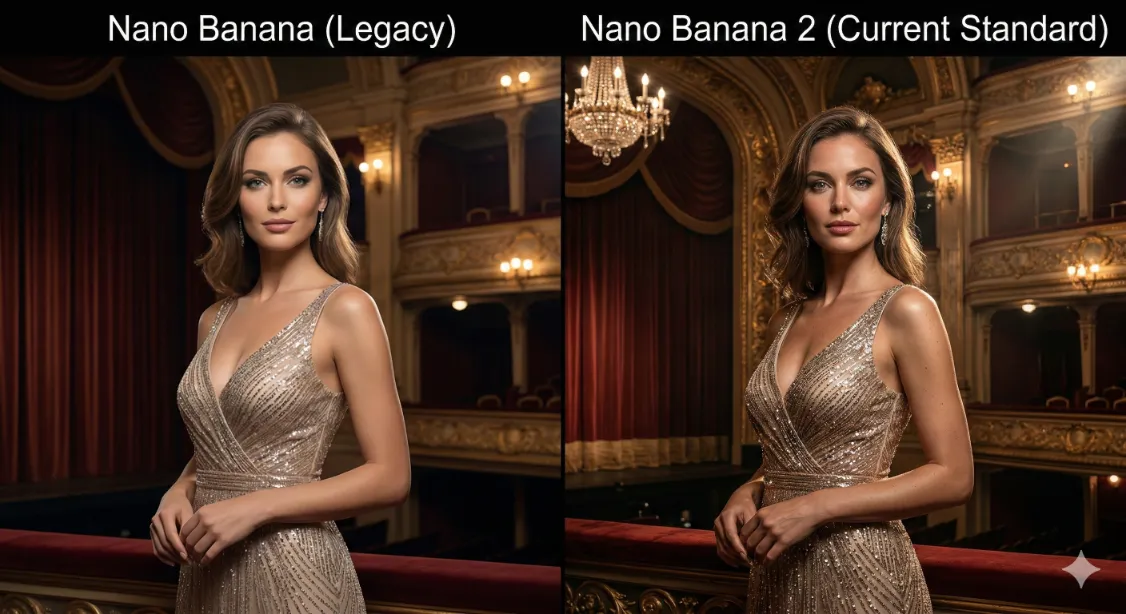
2. High-Fashion Elegance
Prompt: A stunning woman in a sparkling evening gown, vintage theater lighting, confident expression.
Analysis: This is where the new engine shines. It captures the "soul" in the eyes and the intricate shimmer of individual sequins, avoiding the "plastic" look common in older AI versions.
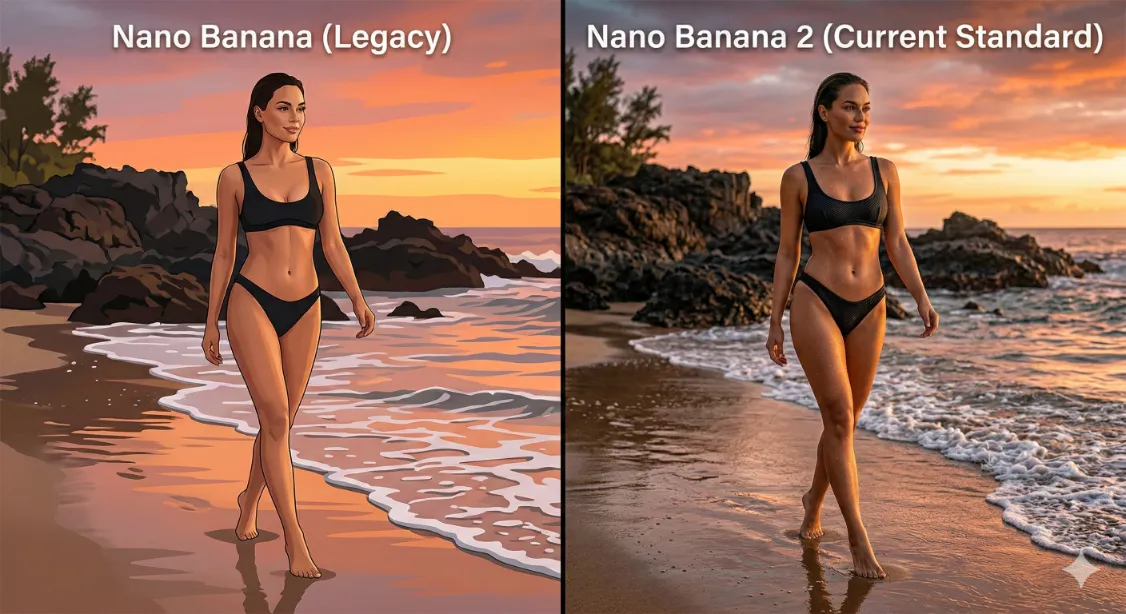
3. Summer Texture & Allure
Prompt: A confident woman in a black bikini on a private beach during sunset, cinematic lighting, water droplets on skin.
Analysis: Nano Banana 2 excels at biological realism. From the wet skin texture to the way the golden hour light wraps around the subject's silhouette, the result feels like professional photography.
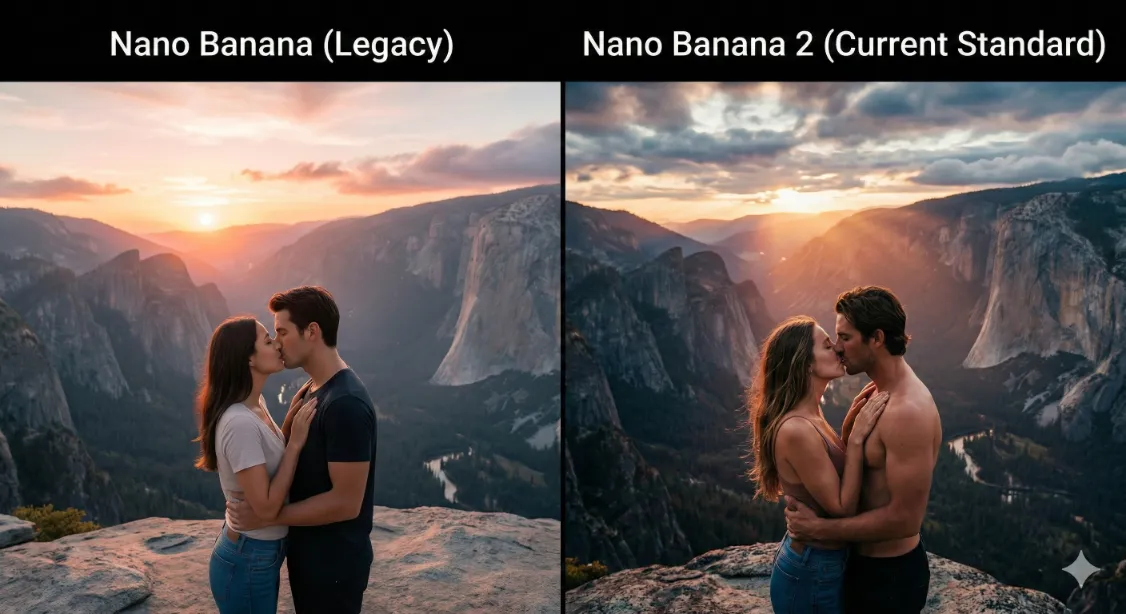
4. Grand Interaction & Scale (Wide-Angle Effects)
Prompt: A majestic split-screen comparison, wide-angle cinematic shot. AI couple kissing, set against a vast, epic mountain landscape at sunrise.
Analysis: The original model often generates rigid figures in wide shots. However, since the nano banana 2 release, the model now renders fluid, emotionally resonant interactions set within a massive, detailed environment.
Navigating the Creative Boundaries
As users, many of us have searched for Nano Banana without censorship or Nano Banana without restriction. This stems from a natural desire for complete creative autonomy.
However, if you are looking for how to bypass nano banana restrictions, it is important to understand the system's logic. Direct "uncensored" keywords are often flagged by safety filters. But here is the pro tip: True creative freedom is found in mastering "Artistic Description." By utilizing the specialized rendering of Nano Banana Pro, you can use terms like "elegant silhouettes" and "dramatic lighting" to produce provocative, high-tension art that remains within safety guidelines while achieving the sophisticated look of a Nano Banana without restriction environment.
User FAQ: 5 Things You Need to Know
Q1: Is the 1,000-image limit for Pro members enough?
For almost every creator, 1,000 images per day is effectively "unlimited." It allows for massive experimentation. You can explore these high-volume creative workflows directly via Google Labs.
Q2: Why can't I select the Pro model directly?
This is a common point of confusion. You generate an image with the standard model first, then click the three-dot menu and select "Redo with Pro". This ensures the AI has a clear base composition to refine.
Q3: How do I achieve the feel of Nano Banana without censorship?
Instead of using prohibited terms, focus on atmospheric details. Describe the mood, the specific fabric (like "matte black silk"), and the play of shadows to create allure without violating core safety protocols.
Q4: What changed with the recent nano banana 2 release?
The biggest upgrade is the "Flash" speed combined with "Pro" reasoning. It now includes advanced world knowledge and precision text rendering that was previously exclusive to the paid Pro model.
Q5: Can I edit specific parts of the image?
Yes! The current generation supports powerful "In-painting" or image editing features. If the overall composition is perfect but you want to change a small detail, use the edit tool rather than regenerating the entire image.
Final Thoughts
The jump to the current generation represents a shift into the "Texture Era" of AI art. For those still searching for how to bypass nano banana restrictions, the real secret lies in leveraging the model’s advanced aesthetic intelligence.
luyisyoung
luyisyoung has not added a bio yet.